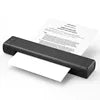
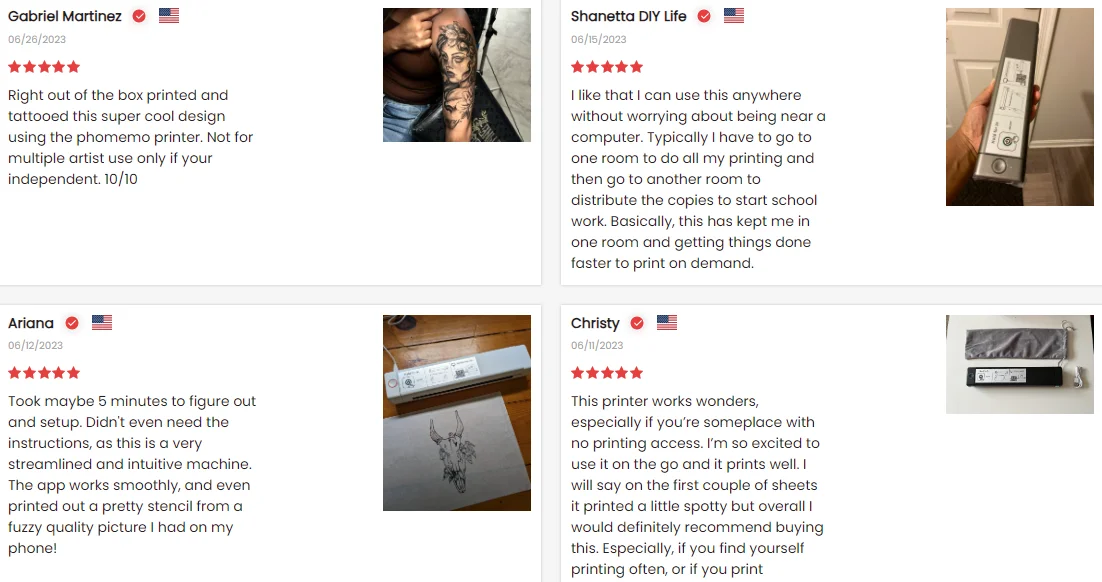
1.) Power on printer. You may have to hold the power button (top left) down for a few seconds if it doesn't come on with one click.
2.) Download the “Phomemo” from your app store.
3). Enable BT on your phone > return to the Phomemo app & click to add device.
4.) Selected the M08F-Letter (for this model)- wait for it to pair & BOOM you should be connected. It took not even 5 minutes to set-up & print. **If pairing took to long - reboot the printer by holding the power button down then back on again & return to the app to pair. It was so easy to set up.
bennysstore1977.com
Phomemo Portable Printer Wireless Thermal Printer With Letter Size Paper Contract Printer for Office/PDF/Travel/Home
Phomemo Portable Printer Wireless Thermal Printer With Letter Size Paper Contract Printer for Office/PDF/Travel/Home
Regular price
$203.00 CAD
Sale price
$203.00 CAD
Shipping calculated at checkout.
Quantity
Couldn't load pickup availability
SPECIFICATIONS
Application: A4 Portable Printer,phomemo
Battery: 1200 mAh,1200mAh
Certification: CE FCC CCC
Color: Black Color
Color Print Speed: Null
Interface Type: Bluetooth
Max. Resolution: 203DPI
Paper type: 216mm Thermal Label Paper
Printing Method: Thermal Printing
Printing type: Thermal
Style: Black and white
Type: Thermal printing
Use: Card Printer/ Barcode Printer/Receipt Printe
accessory specification: Set
after-sales service: Call Center and on-line Technical Support
black print speed: 21mm/s
brand name: Phomemo
max paper size: A4
place of origin: Guangdong,China
private mold: Yes
products status: Stock
software development kit (sdk): Yes
warranty(year): 1-Year
Product Description


How to Print on Phones
Specification
Brand |
Phomemo |
Connectivity Technology |
Bluetooth, USB |
Printing Technology |
Thermal |
Special Feature |
Bluetooth,Portable,Wireless |
Printer Output |
Monochrome |
Controller Type |
iOS, Android |
Scanner Type |
Portable |
Compatible Devices |
Smartphones |
Hardware Interface |
Bluetooth |
Control Method |
APP------" Phomemo " |
About M08F| A4 Portable Printer
* Compact Design - Phomemo M08F-A4 Portable Printer is compact and portable, 80% smaller in size and weight than traditional printers, effortless to hold with one hand. The thermal printer is suitable for any scenarios that require mobile printing in business/travel/car/office/school. For example, print invoices, exam documents, lists and contracts on site.
* Mobile Device Printing - Phomemo M08F Portable Printer features advanced wireless Bluetooth technology. Easily print from your iPhone, iPad, or Android with the Phomemo App.
* Leading Portable Printing Technology - Phomemo M08F-A4 mobile printer adopts thermal printing technology, which no longer needs ink, toner and ribbon, more environmentally friendly, easy to print wherever you need it. (Recommended to search "Phomemo A4 Thermal Paper" to add to cart, use the original consumables to print more clearly)
* High Compatibility - Not only Phomemo M08F-A4 bluetooth printer supports IOS, and Android mobile phone by bluetooth connection,but also supports USB connection for MAC and Windows 7/8/10/11. (PC ONLY supports USB connection printing)
* Big Battery Capacity - Phomemo M08F-A4 portable wireless printer built in 1200mAh rechargeable battery. Can print 130 sheets of A4 thermal paper continuously. (A4 size: 8.27 x 11.6 inches)

Customer Comments
Company Profile



FAQ
Q1: Mobile phone print steps:
A: 1. Download the app "Phomemo" from apple store/google play
2. Open the app and top right select the M08F Series Printer
3. Connect the Bluetooth via "Phomemo" app, not on the phone system
4. When install the paper, the side with the prompt should face up, put the paper in steadily with both hands.
5. You can open the Word/ PDF/ text in email or other APP and then share them to "Phomemo" APP for printing
Q2: Windows 7 & Mac OS 10.0.0 and above print steps
A: 1. Connect the printer to the PC via a USB cable
2. Log in to the official website to download the printer driver or use the attached U disk to install [the latest driver version number: 1.0.2]
3. For detailed installation steps, please refer to the "Installation Video" / "Installation Getting Started Guide.PDF" on the
product page
4. Put the paper flat into the paper inlet, it will automatically suck the paper
Q3: How do I get the latest installed drivers?
A: Enter phomemo official website Support --> Download Center page --> select M08F--> select you OS and download Version latest [1.0.2]
Q4: How to load the paper int the printer correctly
A: 1. Hold the paper by the sides and gently slide it into the printer
2. Keeping the edges of the paper aligned with the guides on each side of the paper input slot on the printer. Don't cant it -keep it straight
3. Don't force it in, but gently push it in about a 2" until the printer picks it up
A: 1. Download the app "Phomemo" from apple store/google play
2. Open the app and top right select the M08F Series Printer
3. Connect the Bluetooth via "Phomemo" app, not on the phone system
4. When install the paper, the side with the prompt should face up, put the paper in steadily with both hands.
5. You can open the Word/ PDF/ text in email or other APP and then share them to "Phomemo" APP for printing
Q2: Windows 7 & Mac OS 10.0.0 and above print steps
A: 1. Connect the printer to the PC via a USB cable
2. Log in to the official website to download the printer driver or use the attached U disk to install [the latest driver version number: 1.0.2]
3. For detailed installation steps, please refer to the "Installation Video" / "Installation Getting Started Guide.PDF" on the
product page
4. Put the paper flat into the paper inlet, it will automatically suck the paper
Q3: How do I get the latest installed drivers?
A: Enter phomemo official website Support --> Download Center page --> select M08F--> select you OS and download Version latest [1.0.2]
Q4: How to load the paper int the printer correctly
A: 1. Hold the paper by the sides and gently slide it into the printer
2. Keeping the edges of the paper aligned with the guides on each side of the paper input slot on the printer. Don't cant it -keep it straight
3. Don't force it in, but gently push it in about a 2" until the printer picks it up